Friday, 28 February 2014

A Small Application to Provide Button Level Validation using VB.NET(using Single Table)

Take One DDL for Select ID,One Label for Msg, Two TextBox for ID & Desc and Six Buttons forAdd,Edit,Update,Clear,Delete and Save Operation.
1.While clicking Add Button- ID of Textbox generate automatically and then write descripion on Desc Textbox and then do operation for Save,Clear Operations.
2.While selecting ID of DDL- Then do for Edit,Update,Delete,Clear Operations.

here done Button Validation through 'Enable' features of Button and use Single Table.

Ans:-

Clicking Add Button..
Clicking Edit Button..
Clicking Update Button..
Clicking Save Button..


Clicking Delete Button:-
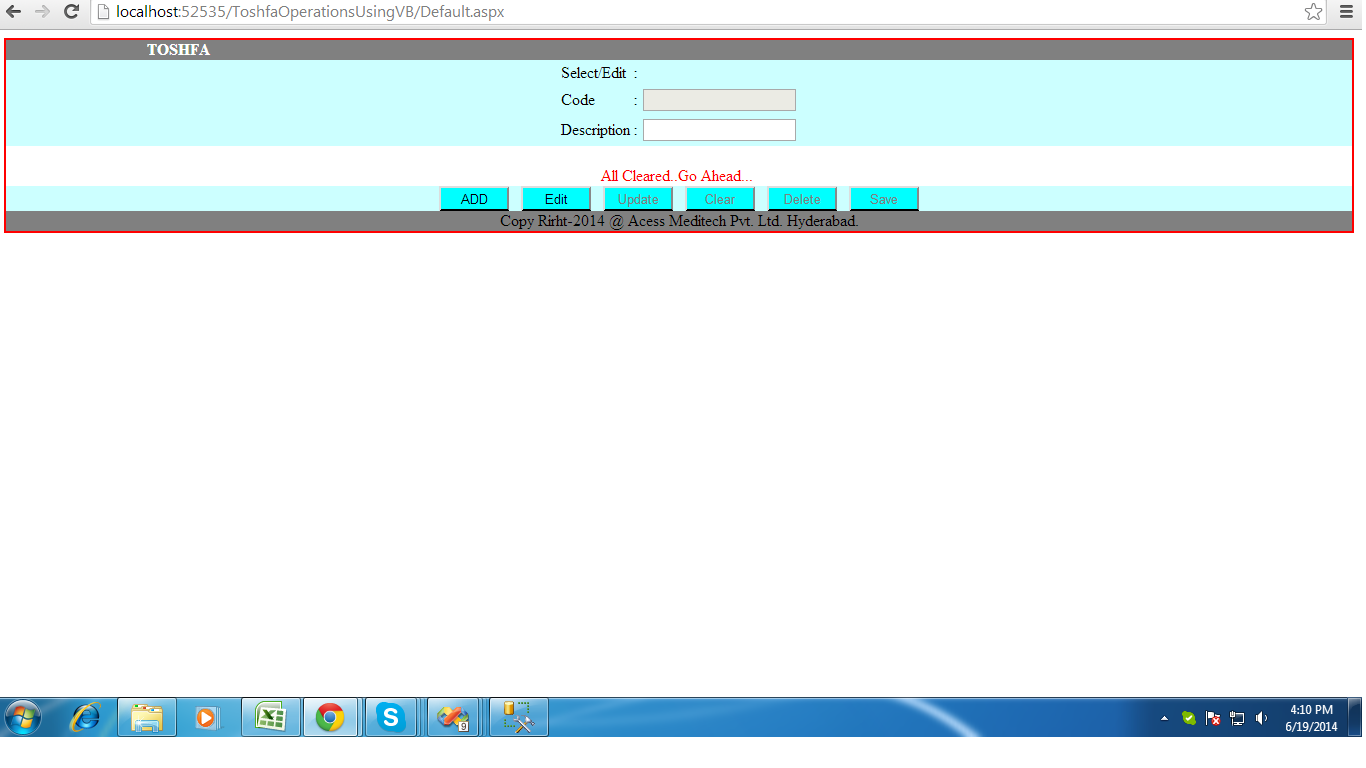
Clicking Clear Button:-


Default.aspx:-

<%@ Page Language="VB" AutoEventWireup="false" CodeFile="Default.aspx.vb" Inherits="_Default" %>
<%@ Register Assembly="System.Web.Extensions, Version=3.5.0.0, Culture=neutral, PublicKeyToken=31bf3856ad364e35"
    Namespace="System.Web.UI" TagPrefix="asp" %>

<!DOCTYPE html PUBLIC "-//W3C//DTD XHTML 1.0 Transitional//EN" "http://www.w3.org/TR/xhtml1/DTD/xhtml1-transitional.dtd">

<html xmlns="http://www.w3.org/1999/xhtml">
<head runat="server">
    <title>Toshfa Operations Using VB</title>
    <%--<script type="text/javascript" language="javascript">
        function validate() {
            var desc = document.getElementById("txtDesc").value;
            var regx = /(^[A-Z]{1}[a-z]*[0-9]*[\s])*&/;
            if (desc.length == "" || desc.length == null) {
                alert("Description should not be Empty..");
                return false;
            }
            else {
                return true;
            }
            if (regx.test(desc)) {
                return true;
            }
            else {
                return false;
            }
        }
    
    </script>--%>
    
    <link href="StyleSheet.css" rel="stylesheet" type="text/css" />
</head>
<body>
    <form id="form1" runat="server">
    <asp:ScriptManager ID="ScriptManager1" runat="server">
    </asp:ScriptManager>
    <div class="divHeader">
    <center>
    <div class="div"><font color="white"> <marquee direction="right"><strong>TOSHFA</strong></marquee></font></div>
    <div class="divMid">
    <asp:UpdatePanel ID="UpdatePanel1" runat="server">
        <ContentTemplate>
    <table>
    <tr><td>Select/Edit</td><td>:</td><td><asp:DropDownList ID="ddlEdit" runat="server" AutoPostBack="true" >
        </asp:DropDownList></td></tr>
    <tr><td>Code</td><td>:</td><td><asp:TextBox ID="txtCode" ReadOnly="true" runat="server"></asp:TextBox></td></tr>
    <tr><td>Description</td><td>:</td><td><asp:TextBox ID="txtDesc" runat="server"></asp:TextBox></td></tr>
        </table> 
        </ContentTemplate>
        </asp:UpdatePanel>                   
        </div> 
        <br />
        <asp:Label ID="lblMsg" ForeColor="Red" runat="server" Text="GetMsgHere.."></asp:Label>
        <br />                
        <div class="divMid">                                                                                                 
        <asp:Button ID="btnAdd" CssClass="button" runat="server" Text="ADD" onclick="btnAdd_Click" 
                AccessKey="A" ToolTip="Alt+A" />
        &nbsp;
        <asp:Button ID="btnEdit" CssClass="button" runat="server" Text="Edit" 
                AccessKey="E" ToolTip="Alt+E" />
        &nbsp;
            <asp:Button ID="btnUpdate" CssClass="button" runat="server" Text="Update" 
                AccessKey="U" ToolTip="Alt+U" />
         &nbsp;
            <asp:Button ID="btnClear" CssClass="button" runat="server" Text="Clear" 
                AccessKey="C" ToolTip="Alt+C" />
             &nbsp;
            <asp:Button ID="btnDelete" CssClass="button" runat="server" Text="Delete" 
                AccessKey="D" ToolTip="Alt+D" />
             &nbsp;
            <asp:Button ID="btnSave" CssClass="button" runat="server" Text="Save" OnClientClick="validate()" AccessKey="S" ToolTip="Alt+S" />
        </div>
        <div class="div">Copy Rirht-2014 @ Acess Meditech Pvt. Ltd. Hyderabad.</div>
   </center>
    
    </div>
    </form>
</body>
</html>

Default.aspx.vb:-

Imports System
Imports System.Data
Imports System.Data.SqlClient

Partial Class _Default
    Inherits System.Web.UI.Page
    Dim cn As SqlConnection
    Dim cmd As SqlCommand
    Dim da As SqlDataAdapter
    Dim dt As DataTable
    Dim obj As New Class1
    Protected Sub Page_Load(ByVal sender As Object, ByVal e As System.EventArgs) Handles Me.Load
        If Page.IsPostBack <> True Then
            DdlVisibility()
            btnAuthentication()
        End If
    End Sub
    Sub DdlVisibility()
        ddlEdit.Visible = False
    End Sub
    Sub btnAuthentication()
        obj.btnAuthentication(btnAdd, btnEdit, btnClear, btnSave, btnUpdate, btnDelete, txtCode, txtDesc)

    End Sub
    Sub AddBtnAuthentication()
        obj.btnAddEnabled(btnAdd, btnEdit, btnClear, btnSave, txtDesc)

    End Sub
    Sub EditBtnAuthentication()
        obj.btnEditEnabled(btnAdd, btnEdit, btnClear, btnUpdate, btnDelete, txtDesc)
    End Sub
    Sub ClrbtnAuthentication()
        obj.btnClearEnabled(btnAdd, btnEdit, btnClear, btnUpdate, btnDelete, btnSave)
    End Sub
    Sub UpdatebtnAuthentication()
        obj.btnUpdateEnabled(btnUpdate, btnDelete)
    End Sub
    Sub SavebtnAuthentication()
        obj.btnSaveEnabled(btnSave, btnClear)
    End Sub
    Sub DeletebtnAuthentication()
        obj.btnDeleteEnabled(btnUpdate, btnDelete)
    End Sub


    Protected Sub btnAdd_Click(ByVal sender As Object, ByVal e As System.EventArgs) Handles btnAdd.Click
        txtDesc.Focus()
        DdlVisibility()
        AddBtnAuthentication()
        cn = New SqlConnection(obj.GetConnection())
        'cn.Open()                                                                      ' --No need to open the connection here
        cmd = New SqlCommand()
        cmd.Connection = cn
        cmd.CommandType = CommandType.StoredProcedure
        cmd.CommandText = "spGetMaxCodeNo"                      '--Here increment the Code as per Max value
        da = New SqlDataAdapter(cmd)
        dt = New DataTable()
        da.Fill(dt)
        If dt.Rows.Count > 0 Then
            txtCode.Text = dt.Rows(0)("code").ToString()
        End If
        'cn.Close ()
    End Sub

    Protected Sub btnSave_Click(ByVal sender As Object, ByVal e As System.EventArgs) Handles btnSave.Click
        SavebtnAuthentication()
        cn = New SqlConnection(obj.GetConnection())

        cmd = New SqlCommand()
        cmd.Connection = cn
        cmd.CommandType = CommandType.StoredProcedure
        cmd.CommandText = "spSaveToshfaData"                                       '--Here Inserting the value in DB
        cmd.Parameters.AddWithValue("@code", txtCode.Text)
        cmd.Parameters.AddWithValue("@description", txtDesc.Text)
        cmd.Parameters.AddWithValue("@smode", "0")
        Dim i As Integer = 0
        Try
            cn.Open()
            i = cmd.ExecuteNonQuery()
            If i > 0 Then
                lblMsg.Text = "Added Successfully.."
            Else
                lblMsg.Text = " Not Added Successfully.."
            End If
        Catch ex As Exception
            lblMsg.Text = ex.Message
        Finally
            cn.Close()
        End Try
    End Sub

    Protected Sub btnEdit_Click(ByVal sender As Object, ByVal e As System.EventArgs) Handles btnEdit.Click
        DdlVisibility()
        ddlEdit.Visible = True
        EditBtnAuthentication()
        cn = New SqlConnection(obj.GetConnection())
        'cn.Open()                                                                          ' --No need to open the connection here
        cmd = New SqlCommand()
        cmd.Connection = cn
        cmd.CommandType = CommandType.StoredProcedure
        cmd.CommandText = "spShowData"                                    '--Here get data in to the DDL from DB
        da = New SqlDataAdapter(cmd)
        dt = New DataTable()
        da.Fill(dt)
        ddlEdit.DataTextField = "description"
        ddlEdit.DataValueField = "code"
        ddlEdit.DataSource = dt
        ddlEdit.DataBind()
        ddlEdit.Items.Insert(0, "--Select--")
        'cn.Close()
    End Sub

    Protected Sub ddlEdit_SelectedIndexChanged(ByVal sender As Object, ByVal e As System.EventArgs) Handles ddlEdit.SelectedIndexChanged
        cn = New SqlConnection(obj.GetConnection())
        'cn.Open()                                                                       '--No need to open the connection here
        cmd = New SqlCommand()
        cmd.Connection = cn
        cmd.CommandType = CommandType.StoredProcedure
        cmd.CommandText = "spEditFrmToshfa"                             '--Here change DDl value as per select
        cmd.Parameters.AddWithValue("@code", ddlEdit.SelectedValue.ToString())
        da = New SqlDataAdapter(cmd)
        dt = New DataTable()
        da.Fill(dt)
        If dt.Rows.Count > 0 Then
            txtCode.Text = dt.Rows(0)("code").ToString()
            txtDesc.Text = dt.Rows(0)("description").ToString()
        End If
        'cn.Close()
    End Sub

    Protected Sub btnUpdate_Click(ByVal sender As Object, ByVal e As System.EventArgs) Handles btnUpdate.Click
        UpdatebtnAuthentication()
        cn = New SqlConnection(obj.GetConnection())

        cmd = New SqlCommand()
        cmd.Connection = cn
        cmd.CommandType = CommandType.StoredProcedure
        cmd.CommandText = "spUpdateToshfaData"                          '--Here Update the data in DB
        cmd.Parameters.AddWithValue("@code", txtCode.Text)
        cmd.Parameters.AddWithValue("@description", txtDesc.Text)
        Dim rowAffected As Integer = 0
        Try
            cn.Open()
            rowAffected = cmd.ExecuteNonQuery()
            If rowAffected > 0 Then
                lblMsg.Text = "Updated.."
            Else
                lblMsg.Text = "Not Updated.."
            End If
        Catch ex As Exception
            lblMsg.Text = ex.Message
        Finally
            cn.Close()
        End Try

    End Sub

    Protected Sub btnDelete_Click(ByVal sender As Object, ByVal e As System.EventArgs) Handles btnDelete.Click
        DeletebtnAuthentication()
        cn = New SqlConnection(obj.GetConnection())

        cmd = New SqlCommand()
        cmd.Connection = cn
        cmd.CommandType = CommandType.StoredProcedure
        cmd.CommandText = "spDeleteFromToshfa"                           '--Here Delete the data from DB
        cmd.Parameters.AddWithValue("@code", txtCode.Text)
        Dim rowAffected As Integer = 0
        Try
            cn.Open()
            rowAffected = cmd.ExecuteNonQuery()
            If rowAffected > 0 Then
                lblMsg.Text = "Deleted Successfully.."
            Else
                lblMsg.Text = "Not Deleted.."
            End If
        Catch ex As Exception
            lblMsg.Text = ex.Message
        Finally
            cn.Close()
        End Try
    End Sub

    Protected Sub btnClear_Click(ByVal sender As Object, ByVal e As System.EventArgs) Handles btnClear.Click
        DdlVisibility()
        ClrbtnAuthentication()
        txtCode.Text = String.Empty.ToString()
        txtDesc.Text = String.Empty.ToString()                          '--Here Clearing the data from txtbx & ddl
        ddlEdit.Items.Clear()
        lblMsg.Text = "All Cleared..Go Ahead..."
    End Sub
End Class

Get Connection Through Class file:-

Imports Microsoft.VisualBasic
Imports System.Web.UI.WebControls.Button
Imports System.Web.UI.WebControls.WebParts

Public Class Class1

    Public Function GetConnection() As String
        Dim strCon As String = "server=192.168.0.200;database=subsdb;user id=sa;pwd=amtpl@123"
        Return strCon
    End Function

    Public Sub btnAuthentication(ByVal bAdd As Button, ByVal bEdit As Button, ByVal bClear As Button, ByVal bSave As Button, ByVal bUpdate As Button, ByVal bDelete As Button, ByVal tbCode As TextBox, ByVal tbDesc As TextBox)

        bAdd.Enabled = False
        bEdit.Enabled = False
        bClear.Enabled = True
        bSave.Enabled = False
        bUpdate.Enabled = False
        bDelete.Enabled = False
        tbCode.Enabled = False
        tbDesc.Enabled = False
    End Sub

    Public Sub btnAddEnabled(ByVal bAdd As Button, ByVal bEdit As Button, ByVal bClear As Button, ByVal bSave As Button, ByVal tbDesc As TextBox)
        bAdd.Enabled = False
        bEdit.Enabled = False
        tbDesc.Enabled = True
        bSave.Enabled = True
        bClear.Enabled = True
    End Sub

    Public Sub btnEditEnabled(ByVal bAdd As Button, ByVal bEdit As Button, ByVal bClear As Button, ByVal bUpdate As Button, ByVal bDelete As Button, ByVal tbDesc As TextBox)
        bAdd.Enabled = False
        tbDesc.Enabled = True
        bUpdate.Enabled = True
        bClear.Enabled = True
        bEdit.Enabled = False
        bDelete.Enabled = True
    End Sub

    Public Sub btnClearEnabled(ByVal bAdd As Button, ByVal bEdit As Button, ByVal bClear As Button, ByVal bUpdate As Button, ByVal bDelete As Button, ByVal bSave As Button)
        bClear.Enabled = False
        bSave.Enabled = False
        bUpdate.Enabled = False
        bDelete.Enabled = False
        bAdd.Enabled = True
        bEdit.Enabled = True
    End Sub

    Public Sub btnUpdateEnabled(ByVal bUpdate As Button, ByVal bDelete As Button)
        bUpdate.Enabled = False
        bDelete.Enabled = False
    End Sub

    Public Sub btnSaveEnabled(ByVal bSave As Button, ByVal bClear As Button)
        bSave.Enabled = False
        bClear.Enabled = True
    End Sub

    Public Sub btnDeleteEnabled(ByVal bUpdate As Button, ByVal bDelete As Button)
        bUpdate.Enabled = False
        bDelete.Enabled = False
    End Sub

End Class

For Style write CSS code here:-

.divHeader
{
    border-color:Red;
    border-style:solid;
    border-width:2px;
    
    }
.div
{
    background-color:Gray;
}
.divMid
{
background-color:#CCFFFF;
}
.button{ background-color:Aqua; 
         border-bottom-color:Black; 
         width:70px; 
         height:25px
}

For Create Table and Stored Procedure:-


use subsdb


create table toshfa(code int constraint p_key primary key,description varchar(30))

--Insert code by max() & pass variable of description
--create proc spAddInToshfa(@description varchar(30))
--as
--begin
--insert into toshfa(code,description)values((select isnull(MAX(code),0)+1 from toshfa),@description)
--end

--exec spAddInToshfa 'fdsgggg'

--insert into test(id,name)values((select isnull(MAX(id),0)+1 from test),'nname')

--Delete

create proc spDeleteFromToshfa(@code int)
as
begin
delete from toshfa where code=@code;
end

exec spDeleteFromToshfa 2

--Edit/using selecting DDL and show in txtbx

create proc spEditFrmToshfa(@code int)
as
begin
select code,description from toshfa where code=@code;
end

--Show Data

create proc spShowData
as
begin
select description+'-'+cast(code as varchar)as description,code  from toshfa
end

--Get Max Code

create proc spGetMaxCodeNo
as
begin
select MAX(code)+1 as code from toshfa;
end

--Save

CREATE proc spSaveToshfaData(@code int,@description varchar(30),@smode int)  
as  
begin  
if @smode=0 
begin
select @code=isnull(max(code),0)+1 from toshfa
insert into toshfa(code,description)values(@code,@description) 
end 
else
begin
update toshfa set description=@description  where code=@code 
end
end

--Save
--create proc spSaveToshfaData(@code int,@description varchar(30))
--as
--begin
--insert into toshfa(code,description)values(@code,@description)
--end

--Update

create proc spUpdateToshfaData(@code int,@description varchar(30))
as
begin
update toshfa set description=@description where code=@code;
end

exec spUpdateToshfaData 1,'subs'

A Small Application to Provide Button Level Validation using C#.NET(using Single Table)

Take One DDL for Select ID,One Label for Msg, Two TextBox for ID & Desc and Six Buttons for Add,Edit,Update,Clear,Delete and Save Operation.
1.While clicking Add Button- ID of Textbox generate automatically and then write descripion on Desc Textbox and then do operation for Save,Clear Operations.
2.While selecting ID of DDL- Then do for Edit,Update,Delete,Clear Operations.

Here done Button Validation through 'Enable' features of Button and use Single Table.

Ans:-

Default.aspx:-

<%@ Page Language="C#" AutoEventWireup="true" CodeFile="Default.aspx.cs" Inherits="_Default" %>

<!DOCTYPE html PUBLIC "-//W3C//DTD XHTML 1.0 Transitional//EN" "http://www.w3.org/TR/xhtml1/DTD/xhtml1-transitional.dtd">

<html xmlns="http://www.w3.org/1999/xhtml">
<head runat="server">
    <title>Button Level Validation Operations</title>
    
    <link href="StyleSheet.css" rel="stylesheet" type="text/css" />
</head>
<body>
    <form id="form1" runat="server">
    <asp:ScriptManager ID="ScriptManager1" runat="server">
    </asp:ScriptManager>
    <div class="divHeader">
    <center>
    <div class="div"><font color="white"> <marquee direction="right"><strong>TOSHFA</strong></marquee></font></div>
    <div class="divMid">
    <asp:UpdatePanel ID="UpdatePanel1" runat="server">
        <ContentTemplate>
    <table>
    <tr><td>Select/Edit</td><td>:</td><td><asp:DropDownList ID="ddlEdit" runat="server" AutoPostBack="true" onselectedindexchanged="ddlEdit_SelectedIndexChanged">
        </asp:DropDownList></td></tr>
    <tr><td>Code</td><td>:</td><td><asp:TextBox ID="txtCode" ReadOnly="true" runat="server"></asp:TextBox></td></tr>
    <tr><td>Description</td><td>:</td><td><asp:TextBox ID="txtDesc" runat="server"></asp:TextBox></td></tr>
        </table> 
        </ContentTemplate>
        </asp:UpdatePanel>                   
        </div> 
        <br />
        <asp:Label ID="lblMsg" ForeColor="Red" runat="server" Text="GetlblMsgHere"></asp:Label>
        <br />                
        <div class="divMid">                                                                                                 
        <asp:Button ID="btnAdd" CssClass="button" runat="server" Text="ADD" onclick="btnAdd_Click" 
                AccessKey="A" ToolTip="Alt+A" />
        &nbsp;
        <asp:Button ID="btnEdit" CssClass="button" runat="server" Text="Edit" onclick="btnEdit_Click" 
                AccessKey="E" ToolTip="Alt+E" />
        &nbsp;
            <asp:Button ID="btnUpdate" CssClass="button" runat="server" Text="Update" 
                onclick="btnUpdate_Click" AccessKey="U" ToolTip="Alt+U" />
         &nbsp;
            <asp:Button ID="btnClear" CssClass="button" runat="server" Text="Clear" 
                onclick="btnClear_Click" AccessKey="C" ToolTip="Alt+C" />
             &nbsp;
            <asp:Button ID="btnDelete" CssClass="button" runat="server" Text="Delete" 
                onclick="btnDelete_Click" AccessKey="D" ToolTip="Alt+D" />
             &nbsp;
            <asp:Button ID="btnSave" CssClass="button" runat="server" Text="Save" OnClientClick="validate()" onclick="btnSave_Click" 
                AccessKey="S" ToolTip="Alt+S" />
        </div>
        <div class="div">Copy Rirht-2014 @ SubsDotNet Hyderabad.</div>
   </center>
    
    </div>
    </form>
</body>
</html>

Default.aspx.cs:-

using System;
using System.Collections;
using System.Configuration;
using System.Data;
using System.Linq;
using System.Web;
using System.Web.Security;
using System.Web.UI;
using System.Web.UI.HtmlControls;
using System.Web.UI.WebControls;
using System.Web.UI.WebControls.WebParts;
using System.Xml.Linq;
using System.Data.SqlClient;

public partial class _Default : System.Web.UI.Page
{
    Class1 obj = new Class1();
    SqlConnection cn;
    SqlCommand cmd;
    SqlDataAdapter da;
    protected void Page_Load(object sender, EventArgs e)
    {

        if (!IsPostBack)
        {
            DdlVisibility();
            BtnAuthentication();
        }
    }
    void DdlVisibility()
    {
        ddlEdit.Visible = false;
    }
    void BtnAuthentication()
    {
        btnAdd.Enabled = true;
        btnEdit.Enabled = true;
        btnClear.Enabled = false;
        btnSave.Enabled = false;
        btnUpdate.Enabled = false;
        btnDelete.Enabled = false;
        txtCode.Enabled = false;
        txtDesc.Enabled = false;
    }
   void  AddBtnAuthentication()
    {
        btnAdd.Enabled = false;
        btnEdit.Enabled = false;
        txtDesc.Enabled = true;
        btnSave.Enabled = true;
        btnClear.Enabled = true;
    }
   void EditBtnAuthentication()
   {
       btnAdd.Enabled = false;
       txtDesc.Enabled = true;
       btnUpdate.Enabled = true;
       btnClear.Enabled = true;
       btnEdit.Enabled = false;
       btnDelete.Enabled = true;
   }
   void ClrbtnAuthentication()
   {
       btnClear.Enabled = false;
       btnSave.Enabled = false;
       btnUpdate.Enabled = false;
       btnDelete.Enabled = false;
       btnAdd.Enabled = true;
       btnEdit.Enabled = true;
   }
   void UpdatebtnAuthentication()
   {
       btnUpdate.Enabled = false;
       btnDelete.Enabled = false;
   }
   void SavebtnAuthentication()
   {
       btnSave.Enabled = false;
       btnClear.Enabled = true;
       
   }
   void DeletebtnAuthentication()
   {
       btnUpdate.Enabled = false;
       btnDelete.Enabled = false;
   }

    protected void btnEdit_Click(object sender, EventArgs e)
    {
        DdlVisibility();
        EditBtnAuthentication();
        ddlEdit.Visible = true;
        
        cn = new SqlConnection(obj.GetConnection());
        cn.Open();
        cmd = new SqlCommand();
        cmd.Connection = cn;
        cmd.CommandType = CommandType.StoredProcedure;
        cmd.CommandText = "spShowData";                                //--Here get data in to the DDL from DB
        da = new SqlDataAdapter(cmd);
        DataTable dt = new DataTable();
        da.Fill(dt);
        ddlEdit.DataTextField = "description";
        ddlEdit.DataValueField = "code";
        ddlEdit.DataSource = dt;
        ddlEdit.DataBind();
        ddlEdit.Items.Insert(0, "--Select--");
        cn.Close();


    }
    protected void ddlEdit_SelectedIndexChanged(object sender, EventArgs e)
    {
        cn = new SqlConnection(obj.GetConnection());
        cn.Open();
        cmd = new SqlCommand();
        cmd.Connection = cn;
        cmd.CommandType = CommandType.StoredProcedure;
        cmd.CommandText = "spEditFrmToshfa";                           //--Here change DDl value as per select
        cmd.Parameters.AddWithValue("@code", SqlDbType.Int).Value = ddlEdit.SelectedValue.ToString();
        da = new SqlDataAdapter(cmd);
        DataTable dt = new DataTable();
        da.Fill(dt);
        if (dt.Rows.Count > 0)
        {
            //txtName.Text=ds.Tables["Emp"].Rows[0]["name"].ToString();         // --it will use when we will take DataSet instead of DataTable

            txtCode.Text = dt.Rows[0]["code"].ToString();
            txtDesc.Text = dt.Rows[0]["description"].ToString();
        }
        cn.Close();
    }
    protected void btnAdd_Click(object sender, EventArgs e)
    {
        AddBtnAuthentication();
        txtDesc.Focus();
        DdlVisibility();

        cn = new SqlConnection(obj.GetConnection());
        
        cmd = new SqlCommand();
        cmd.Connection = cn;

        cmd.CommandText = "select isnull(max(code),0)+1 code from toshfa";
        var j = "";
        try
        {
            cn.Open();
            j = cmd.ExecuteScalar().ToString();                        //--While using aggregate function  
            txtCode.Text = Convert.ToString(j);
        }
        catch (Exception ex)
        {
            lblMsg.Text = ex.Message;
        }
        finally
        {
            cn.Close();
        }

        //int i = Convert.ToInt32(cmd.ExecuteScalar());                //--it is same as above 2 lines code
        //txtCode.Text =Convert.ToString(i);

        //cmd.CommandType = CommandType.StoredProcedure;          //--we can use it instead of above 3 lines code

        //cmd.CommandText = "spGetMaxCodeNo";
        //da = new SqlDataAdapter(cmd);
        //DataTable dt = new DataTable();
        //da.Fill(dt);
        //if (dt.Rows.Count >= 0)
        //{
        //    txtCode.Text = dt.Rows[0]["code"].ToString();
        //}

    }
    protected void btnClear_Click(object sender, EventArgs e)
    {
        ClrbtnAuthentication();
        DdlVisibility();

        txtCode.Text = string.Empty.ToString();
        txtDesc.Text = string.Empty.ToString();
        ddlEdit.Items.Clear();
        lblMsg.Text = "All Cleared..Go Ahead...";
    }
    protected void btnSave_Click(object sender, EventArgs e)
    {
        SavebtnAuthentication();

        cn = new SqlConnection(obj.GetConnection());
        cmd = new SqlCommand();
        cmd.Connection = cn;
        cmd.CommandType = CommandType.StoredProcedure;
        cmd.CommandText = "spSaveToshfaData";

        cmd.Parameters.Add("@code", txtCode.Text);            //--depricated/expired-we can use below code
        cmd.Parameters.Add("@description", txtDesc.Text);
        cmd.Parameters.Add("@smode", "0");
        int i = 0;
        try
        {
            cn.Open();
            i = cmd.ExecuteNonQuery();
            if (i > 0)
            {
                lblMsg.Text = "Added Successfully..";
            }
            else
            {
                lblMsg.Text = "Not Added Successfully..";
            }
        }
        catch (Exception ex)
        {
            lblMsg.Text = ex.Message;
        }
        finally
        {
            cn.Close();
        }
       

        //cmd.Parameters.AddWithValue("@code", SqlDbType.Int).Value = txtCode.Text;            //--we can use it instead of above depricated/expired lines code

        //cmd.Parameters.AddWithValue("@description", SqlDbType.VarChar).Value = txtDesc.Text;

        //da = new SqlDataAdapter(cmd);                               //--No need of use it for update single record
        //DataTable dt = new DataTable();
        //da.Fill(dt);

        //int rowAffected = cmd.ExecuteNonQuery();
        //if (rowAffected > 0)
        //{
        //    lblMsg.Text = "Added Successfully..";
        //}
        //else
        //{
        //    lblMsg.Text = "Not Added Successfully..";
        //}


        //txtCode.Text = string.Empty.ToString();               //--we can use it for clearing txtbx bt no need here
        //txtDesc.Text = string.Empty.ToString();
    }
    protected void btnDelete_Click(object sender, EventArgs e)
    {
        DeletebtnAuthentication();

        cn = new SqlConnection(obj.GetConnection());
       
        cmd = new SqlCommand();
        cmd.Connection = cn;
        cmd.CommandType = CommandType.StoredProcedure;
        cmd.CommandText = "spDeleteFromToshfa";
        cmd.Parameters.AddWithValue("@code", txtCode.Text);

        //da = new SqlDataAdapter(cmd);                           //--No need of use it for update single record
        //DataTable dt = new DataTable();
        //da.Fill(dt);

        int rowAffected = 0;
        try
        {
            cn.Open();
            rowAffected = cmd.ExecuteNonQuery();
            if (rowAffected > 0)
            {
                lblMsg.Text = "Deleteded Successfully..";
            }
            else
            {
                lblMsg.Text = "Not Deleted Successfully..";
            }
        }
        catch (Exception ex)
        {
            lblMsg.Text = ex.Message;
        }
        finally
        {
            cn.Close();
        }
        //txtCode.Text = string.Empty.ToString();              //--we can use it for clearing txtbx bt no need here
        //txtDesc.Text = string.Empty.ToString();
    }
    protected void btnUpdate_Click(object sender, EventArgs e)
    {
        DdlVisibility();
        UpdatebtnAuthentication();

        cn = new SqlConnection(obj.GetConnection());
        
        cmd = new SqlCommand();
        cmd.Connection = cn;
        cmd.CommandType = CommandType.StoredProcedure;
        cmd.CommandText = "spUpdateToshfaData";
        cmd.Parameters.AddWithValue("@code", SqlDbType.Int).Value = txtCode.Text;
        cmd.Parameters.AddWithValue("@description", SqlDbType.VarChar).Value = txtDesc.Text;

        //da = new SqlDataAdapter(cmd);                                  //--No need of use it for update single record
        //DataTable dt = new DataTable();
        //da.Fill(dt);

        int rowAffected = 0;
        try
        {
            cn.Open();
            rowAffected = cmd.ExecuteNonQuery();
            if (rowAffected > 0)
            {
                lblMsg.Text = "Updated Successfully..";
            }
            else
            {
                lblMsg.Text = "Not Updated Successfully..";
            }
        }
            catch(Exception ex)
        {
                lblMsg.Text =ex.Message;
        }
        finally
        {
            cn.Close();
        }

        //txtCode.Text = string.Empty.ToString();                                      // --we can use it for clearing txtbx bt no need here
        //txtDesc.Text = string.Empty.ToString();
    }
}

Get Connection Through Class File:-

using System;
using System.Data;
using System.Configuration;
using System.Linq;
using System.Web;
using System.Web.Security;
using System.Web.UI;
using System.Web.UI.HtmlControls;
using System.Web.UI.WebControls;
using System.Web.UI.WebControls.WebParts;
using System.Xml.Linq;

/// <summary>
/// Summary description for Class1
/// </summary>
public class Class1
{
public Class1()
{
//
// TODO: Add constructor logic here
//
}
    public string GetConnection()
    {
        string strCon = "server=192.168.0.200;database=subsdb;user id=sa;pwd=amtpl@123";
        return strCon;
    }
    
}

For Style write code in CSS file:-

.divHeader
{
    border-color:Red;
    border-style:solid;
    border-width:2px;
    
    }
.div
{
    background-color:Gray;
}
.divMid
{
background-color:#CCFFFF;
}
.button{ background-color:Aqua; 
         border-bottom-color:Black; 
         width:70px; 
         height:25px
}

For Create Table & Stored Procedure:-

use subsdb

create table toshfa(code int constraint p_key primary key,description varchar(30))

--Insert code by max() & pass variable of description
--create proc spAddInToshfa(@description varchar(30))
--as
--begin
--insert into toshfa(code,description)values((select isnull(MAX(code),0)+1 from toshfa),@description)
--end

--exec spAddInToshfa 'fdsgggg'

--insert into test(id,name)values((select isnull(MAX(id),0)+1 from test),'nname')

--Delete

create proc spDeleteFromToshfa(@code int)
as
begin
delete from toshfa where code=@code;
end

exec spDeleteFromToshfa 2

--Edit/using selecting DDL and show in txtbx

alter proc spEditFrmToshfa(@code int)
as
begin
select code,description from toshfa where code=@code;
end

--Show Data

create proc spShowData
as
begin
select description+'-'+cast(code as varchar)as description,code  from toshfa
end

--Get Max Code

create proc spGetMaxCodeNo
as
begin
select MAX(code)+1 as code from toshfa;
end

--Save

CREATE proc spSaveToshfaData(@code int,@description varchar(30),@smode int)
as
begin
if @smode=0
begin
select @code=isnull(max(code),0)+1 from toshfa
insert into toshfa(code,description)values(@code,@description)
end
else
begin
update toshfa set description=@description  where code=@code
end
end

--Save
--create proc spSaveToshfaData(@code int,@description varchar(30))
--as
--begin
--insert into toshfa(code,description)values(@code,@description)
--end

--Update

create proc spUpdateToshfaData(@code int,@description varchar(30))
as
begin
update toshfa set description=@description where code=@code;
end

exec spUpdateToshfaData 1,'subs'

DropDownList Operation using ASP.NET(Example of State-City)

Take two DDL controls one is for State and another for City.While select particular State on One DDL automatically City would be selected on Second DDL.

Ans:-

In Default.aspx:-

<%@ Page Language="C#" AutoEventWireup="true" CodeFile="Default.aspx.cs" Inherits="_Default" %>

<!DOCTYPE html PUBLIC "-//W3C//DTD XHTML 1.0 Transitional//EN" "http://www.w3.org/TR/xhtml1/DTD/xhtml1-transitional.dtd">

<html xmlns="http://www.w3.org/1999/xhtml">
<head runat="server">
    <title>Select State and See City Operation</title>
</head>
<body>
    <form id="form1" runat="server">
   
    <div>
    <center>
    States :
    <asp:DropDownList ID="ddlState" runat="server" AutoPostBack="true"
            onselectedindexchanged="ddlState_SelectedIndexChanged">
    </asp:DropDownList>
    &nbsp;
    City :
    <asp:DropDownList ID="ddlCity" runat="server">
    </asp:DropDownList>
    </center>
   
    </div>
    </form>
</body>
</html>

In Default.aspx.cs:-

using System;
using System.Collections;
using System.Configuration;
using System.Data;
using System.Linq;
using System.Web;
using System.Web.Security;
using System.Web.UI;
using System.Web.UI.HtmlControls;
using System.Web.UI.WebControls;
using System.Web.UI.WebControls.WebParts;
using System.Xml.Linq;
using System.Data.SqlClient;


public partial class _Default : System.Web.UI.Page
{
    static SqlConnection cn;
    static SqlCommand cmd;
    static SqlDataAdapter da;
    static string conn = ConfigurationManager.ConnectionStrings["conStr"].ConnectionString;
    protected void Page_Load(object sender, EventArgs e)
    {
        if (!IsPostBack)
        {
            BindDDLstateData();
        }
   
    }
    void BindDDLstateData()
    {
        cn = new SqlConnection(conn);
        cmd = new SqlCommand();
        cmd.Connection = cn;
        cmd.CommandType = CommandType.StoredProcedure;
        cmd.CommandText = "spGetStateData";
        da = new SqlDataAdapter(cmd);
        DataSet ds = new DataSet();
        da.Fill(ds,"state");

        ddlState.DataValueField = "sid";
        ddlState.DataTextField = "sname";
       
        ddlState.DataSource = ds;
        ddlState.DataBind();

        //ddlState.Items.Insert(0, new ListItem("--Select--", "0"));
        //ddlCity.Items.Insert(0, new ListItem("--Select--", "0"));
        //OR

        ddlState.Items.Insert(0, "--Select--");
        ddlCity.Items.Insert(0, "--Select--"); 

    }
    protected void ddlState_SelectedIndexChanged(object sender, EventArgs e)
    {
        cn = new SqlConnection(conn);
        cn.Open();
        cmd = new SqlCommand();
        cmd.Connection = cn;
        cmd.CommandType = CommandType.StoredProcedure;
        cmd.CommandText = "spGetCityfromSelectingState";

        //cmd.Parameters.Add("@sid", SqlDbType.Int).Value = ddlState.SelectedValue.ToString();
        //OR

        cmd.Parameters.AddWithValue("@sid", SqlDbType.Int).Value = ddlState.SelectedValue.ToString() ?? "";

        da = new SqlDataAdapter(cmd);
        DataSet ds = new DataSet();
        da.Fill(ds, "city");
        
        ddlCity.DataValueField = "cid";
        ddlCity.DataTextField = "cname";
       
         ddlCity.DataSource = ds;
         ddlCity.DataBind();

         ddlCity.Items.Insert(0, "--Select--");

        cn.Close();
    }
}

In web.config:-

<connectionStrings>
<add name="conStr" connectionString="server=.;database=subsdb;user id=sa;pwd=123"/>
</connectionStrings>

Create Table in Sql.Server:-

1.create table state(sid int constraint pr_key2 primary key,sname varchar(30))

2.create table city(cid int constraint pr_key3 primary key,cname varchar(30),sid int constraint fr_key foreign key references state(sid))

Insert Data in Table:-

1.insert into state(sid,sname)values(7,'gujurat')

2.insert into city(cid,cname,sid)values(106,'bangaluru',6)

Create Stored Procedures:-

1.create proc spGetStateData
as
begin
select sname,sid from state
end

2.create proc spGetCityfromSelectingState(@sid int)
as
begin
select cname from city where sid in(select sid from state where sid=@sid)
end

exec spGetCityfromSelectingState 1